Launcher应用图标显示流程

基于Android U

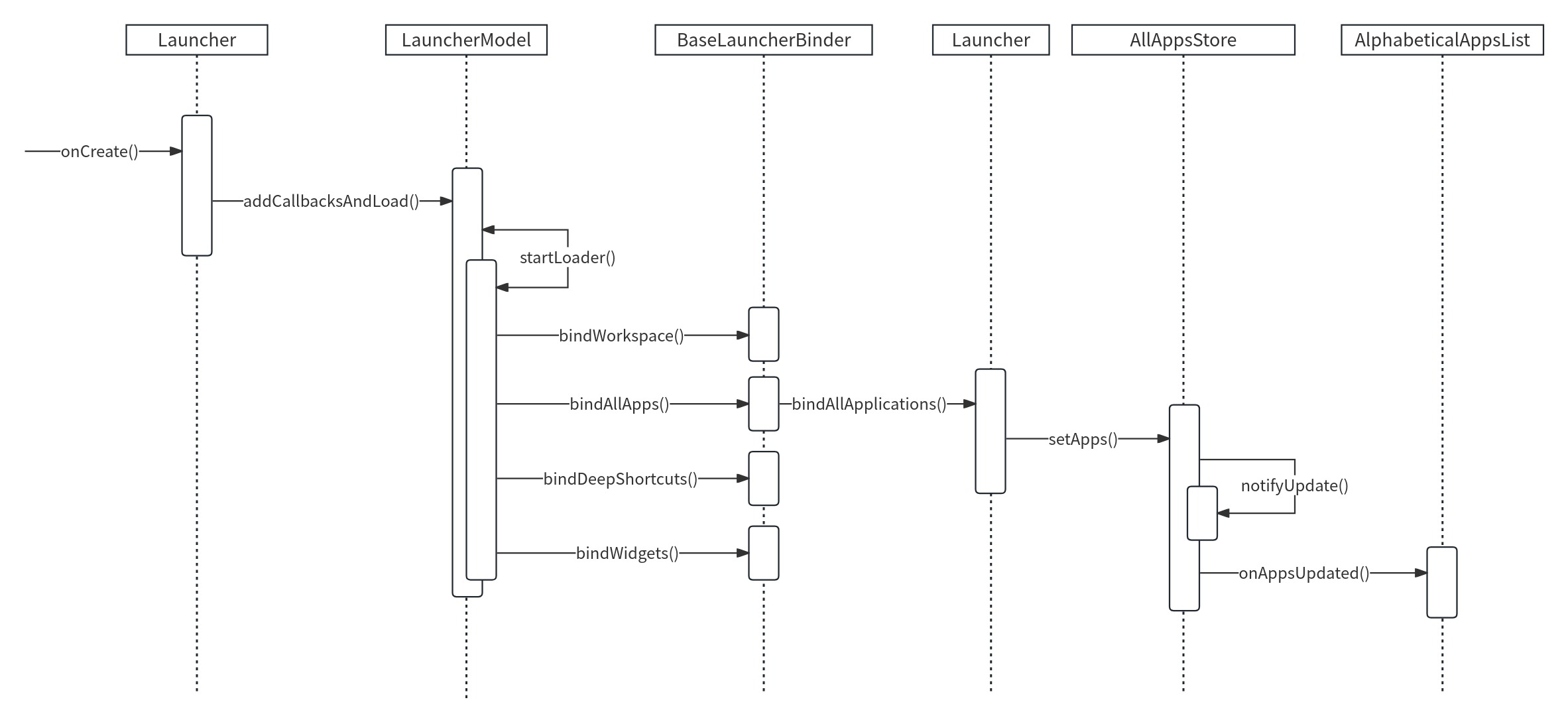
时序图如下:

  1. 初始化
1
2
3
4
5
6
7
8
9
10
11
packages/apps/Launcher3/src/com/android/launcher3/Launcher.java
protected void onCreate(Bundle savedInstanceState) {
...
LauncherAppState app = LauncherAppState.getInstance(this); // 获取LauncherAppState的实例
mModel = app.getModel(); // 获取LauncherModel的实例
...
if (!mModel.addCallbacksAndLoad(this)) { // 加载,CallBacks指向Launcher
...
}
...
}
  • LauncherAppState的构造方法中初始化了一个InvariantDeviceProfile类,该类的构造方法中进行了一系列的配置,如:桌面的行、列、Hotseat(桌面底部固定的应用栏)的个数、Hotseat所有应用的位置、布局id、文件夹的行列、图标的大小等。此外,还会解析device_profiles.xml文件,加载默认页的资源文件。
  • mModel.addCallbacksAndLoad()会进行数据加载。
  1. 加载
1
2
3
4
5
6
7
8
9
10
11
12
13
14
15
16
17
18
19
20
21
22
23
24
25
26
27
28
29
30
31
32
33
34
35
36
37
packages/apps/Launcher3/src/com/android/launcher3/LauncherModel.java
public boolean addCallbacksAndLoad(@NonNull final Callbacks callbacks) {
synchronized (mLock) {
addCallbacks(callbacks);
return startLoader(new Callbacks[] { callbacks });
}
}

private boolean startLoader(@NonNull final Callbacks[] newCallbacks) {
...
synchronized (mLock) {
...
if (callbacksList.length > 0) {
...
if (bindDirectly) {
// Divide the set of loaded items into those that we are binding synchronously,
// and everything else that is to be bound normally (asynchronously).
launcherBinder.bindWorkspace(bindAllCallbacks, /* isBindSync= */ true);

// For now, continue posting the binding of AllApps as there are other
// issues that arise from that.
launcherBinder.bindAllApps();
launcherBinder.bindDeepShortcuts();
launcherBinder.bindWidgets();
if (FeatureFlags.CHANGE_MODEL_DELEGATE_LOADING_ORDER.get()) {
mModelDelegate.bindAllModelExtras(callbacksList);
}
return true;
} else {
// Always post the loader task, instead of running directly
// (even on same thread) so that we exit any nested synchronized blocks
MODEL_EXECUTOR.post(mLoaderTask);
}
}
}
return false;
}

bindWorkspace():创建CellLayout,并添加到WorkSpace容器中;

bindAllApps():绑定所有icon图标到CellLayout对应的recyclerView中,即app图标加载;

bindDeepShortcuts():加载快捷方式;

bindWidgets():加载桌面widget。

  1. 加载应用程序信息
1
2
3
4
5
6
packages/apps/Launcher3/src/com/android/launcher3/model/BaseLauncherBinder.java
public void bindAllApps() {
...
executeCallbacksTask(c -> c.bindAllApplications(apps, flags, packageUserKeytoUidMap),
mUiExecutor);
}

调用callbacks的bindAllApplications(),这个callbacks实际指向Launcher。

  1. 加载应用图标
1
2
3
4
5
6
7
8
packages/apps/Launcher3/src/com/android/launcher3/Launcher.java
public void bindAllApplications(AppInfo[] apps, int flags,
Map<PackageUserKey, Integer> packageUserKeytoUidMap) {
...
AllAppsStore appsStore = mAppsView.getAppsStore();
appsStore.setApps(apps, flags, packageUserKeytoUidMap);
...
}

调用AllAppsStore的setApps()方法,并将包含应用信息的列表apps传进去。

1
2
3
4
5
6
7
8
9
10
11
12
13
14
15
packages/apps/Launcher3/src/com/android/launcher3/allapps/AllAppsStore.java
public void setApps(AppInfo[] apps, int flags, Map<PackageUserKey, Integer> map) {
mApps = apps;
mModelFlags = flags;
notifyUpdate();
mPackageUserKeytoUidMap = map;
}

private void notifyUpdate() {
...
for (OnUpdateListener listener : mUpdateListeners) {
...
listener.onAppsUpdated();
}
}

setApps()会将包含应用信息的列表apps设置给mApps,然后通知View刷新界面。

  1. 刷新界面
1
2
3
4
5
6
7
8
9
10
11
12
13
14
15
16
17
18
19
20
21
22
23
24
25
26
27
28
29
30
31
32
33
34
35
36
packages/apps/Launcher3/src/com/android/launcher3/allapps/AlphabeticalAppsList.java
public void onAppsUpdated() {
if (mAllAppsStore == null) {
return;
}
// Sort the list of apps
mApps.clear();

Stream<AppInfo> appSteam = Stream.of(mAllAppsStore.getApps());
if (!hasSearchResults() && mItemFilter != null) {
appSteam = appSteam.filter(mItemFilter);
}
appSteam = appSteam.sorted(mAppNameComparator);

// As a special case for some languages (currently only Simplified Chinese), we may need to
// coalesce sections
Locale curLocale = mActivityContext.getResources().getConfiguration().locale;
boolean localeRequiresSectionSorting = curLocale.equals(Locale.SIMPLIFIED_CHINESE);
if (localeRequiresSectionSorting) {
// Compute the section headers. We use a TreeMap with the section name comparator to
// ensure that the sections are ordered when we iterate over it later
appSteam = appSteam.collect(Collectors.groupingBy(
info -> info.sectionName,
() -> new TreeMap<>(new LabelComparator()),
Collectors.toCollection(ArrayList::new)))
.values()
.stream()
.flatMap(ArrayList::stream);
}

appSteam.forEachOrdered(mApps::add);
// Recompose the set of adapter items from the current set of apps
if (mSearchResults.isEmpty()) {
updateAdapterItems();
}
}
AlphabeticalAppsList实现了OnUpdateListener接口。


Launcher应用图标显示流程
https://citrus-maxima.github.io/2024/03/10/Launcher应用图标显示流程/
作者
柚子树
发布于
2024年3月10日
许可协议